What is a 401(k) max per paycheck calculator?
A 401(k) max per paycheck calculator helps you figure out how much to contribute from each remaining paycheck so you can reach your annual employee contribution target. Instead of only dividing the annual limit by 12 or 26, this calculator also considers how much you have already contributed and how many pay periods are still left in the year.
This is useful when you start a new job mid-year, change your payroll election after a raise, receive a bonus, or notice that your current contribution rate is not on pace to max out. It can also help you avoid overshooting the IRS employee deferral limit.
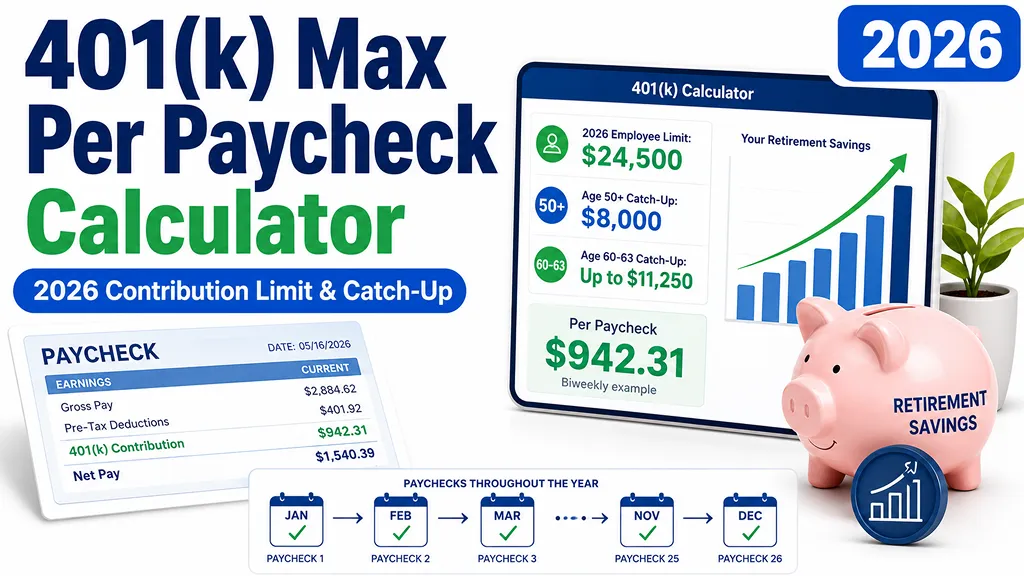
2026 401(k) contribution limits used by this calculator
The calculator uses the following 2026 limits for most traditional and safe harbor 401(k) plans:
401(k) contribution per paycheck formula
The main formula is:
Required per paycheck = (annual target - year-to-date employee contributions) / remaining pay periods
If you also enter gross pay per paycheck, the calculator estimates the payroll percentage:
Required payroll percentage = required per paycheck / gross pay per paycheck × 100
Full-year per-paycheck reference
If you started contributing from the first paycheck of 2026 with no prior contributions, the approximate amount per paycheck would look like this:
How to use this calculator
- Enter your age at the end of 2026.
- Choose whether you want to max out the full eligible limit, only the base limit, or a custom target.
- Select your pay frequency: weekly, biweekly, semi-monthly, monthly, or custom.
- Enter how many pay periods remain in 2026.
- Enter your year-to-date employee 401(k) contributions from your pay stub or plan dashboard.
- Optionally enter your gross pay and current payroll election to see the required percentage and projected shortfall.
What counts toward the employee limit?
Traditional 401(k) employee deferrals and Roth 401(k) employee deferrals generally share the same employee elective deferral limit. Employer match, profit-sharing, and other employer contributions do not reduce your employee deferral limit, but they can matter for the overall defined contribution plan limit.
Why remaining pay periods matter
The later in the year you adjust your contribution, the higher the required amount per paycheck becomes. For example, someone paid biweekly has 26 paychecks in a normal year. If only 10 paychecks remain, the remaining contribution target must be spread over those 10 paychecks, not the full 26.
Catch-up contributions by age
If you are age 50 or older by the end of 2026, your plan may allow catch-up contributions. For ages 60, 61, 62, and 63, a higher catch-up limit may apply under SECURE 2.0. Plan rules can vary, so confirm whether your employer’s plan supports the applicable catch-up feature.
Avoiding match problems when maxing out early
Some employees prefer to front-load 401(k) contributions early in the year. That can be useful for cash-flow planning, but it can create a matching issue in plans that calculate the match separately each paycheck. If contributions stop before year-end and the plan does not provide a true-up match, some employer match may be missed.
Important limitations
This calculator is an educational planning tool. Your actual limit may be affected by plan terms, employer payroll settings, nondiscrimination testing, multiple-employer deferrals, automatic limit stopping rules, Roth catch-up rules, bonus payroll treatment, and whether your plan supports a true-up match. Always confirm final contribution settings with your employer, payroll team, or plan administrator.
FAQ
- Q. Does employer match count toward my 401(k) employee contribution limit?A. No. Employer match does not reduce the employee elective deferral limit. However, employer contributions can count toward the overall defined contribution plan limit.
- Q. Should I use age today or age at the end of 2026?A. Use your age at the end of the calendar year. Catch-up eligibility is generally based on whether you are age 50 or older by year-end.
- Q. What if my payroll only accepts whole percentages?A. Use the rounded-up percentage estimate, then check whether your plan automatically stops employee contributions at the annual limit. If it does not, you may need to adjust the final paycheck manually.
- Q. Why is my required percentage so high?A. It usually means the remaining target is being spread over too few paychecks. A low year-to-date contribution, mid-year job change, or late-year adjustment can make the required paycheck amount much higher.
- Q. Can I max out with bonus pay?A. Often yes, but bonus payroll rules differ by employer. Some plans apply a separate bonus deferral election, while others use the same percentage as regular pay.