
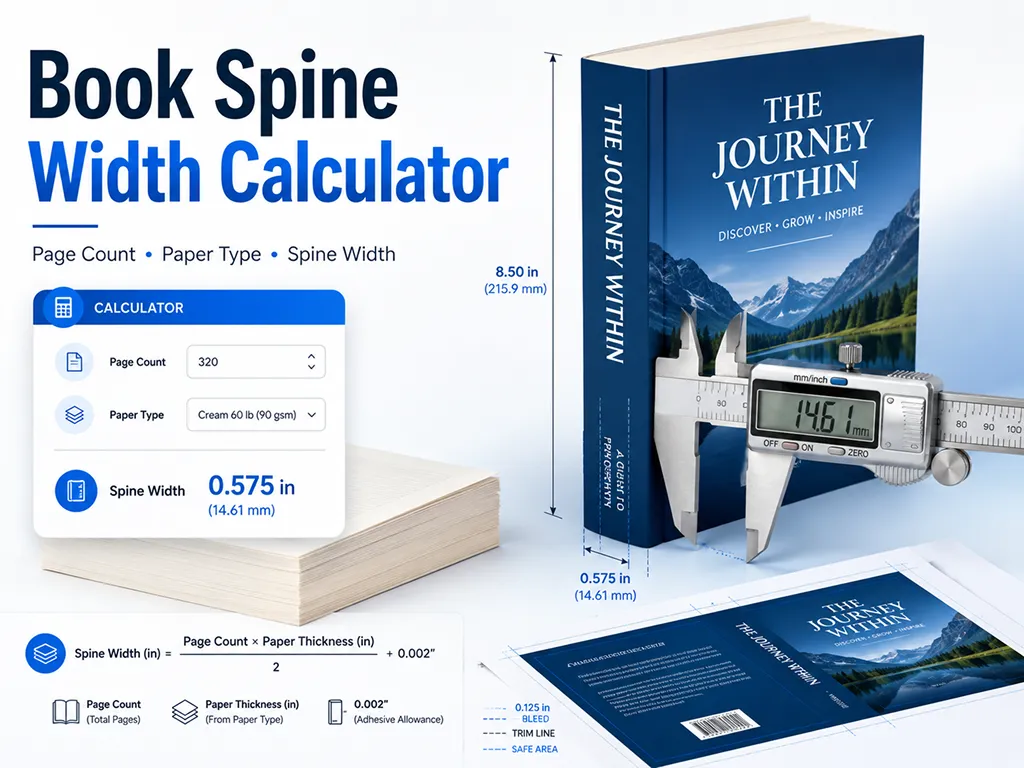
Enter your final interior page count, paper type, and trim size to calculate the estimated book spine width, full paperback cover size, bleed area, and safe spine text width in inches, millimeters, and pixels.
Spine width is based on the final number of interior pages in the print book, including front matter, blank pages, and back matter. If your printer changes the final page count, recalculate the spine before uploading your cover.
What is book spine width?
Book spine width is the thickness of the spine area between the front cover and back cover of a printed book. In a paperback or perfect-bound book, the spine width depends mainly on the final interior page count and the paper thickness.
A book spine width calculator helps you estimate this measurement before designing a full-wrap book cover. It is useful for Amazon KDP, IngramSpark, local print shops, self-published paperbacks, novels, journals, workbooks, manuals, and any cover layout where the front cover, spine, and back cover are designed as one continuous file.
Spine width matters because it affects the total cover size, the placement of the front and back cover, the position of the barcode, and whether the book title or author name can safely fit on the spine. Even a small spine size error can make the printed cover look off-center or cause spine text to wrap onto the front or back cover.
Book spine width formula
The most common book spine width formula is:
Spine width = page count × paper thickness factor
For print-on-demand paperbacks, the paper thickness factor is usually provided by the print platform or printer. For example, KDP uses different spine multipliers depending on the interior paper type, such as white paper, cream paper, premium color, or standard color.
Page count vs sheet count
For KDP-style spine calculations, use the final page count, not the number of sheets. A 300-page book means 300 interior pages in the final PDF. Do not divide the page count by two unless your printer specifically gives you the physical thickness of one sheet of paper.
Some traditional printers describe paper thickness as the caliper of one physical sheet. In that case, two printed pages share one sheet, so the formula becomes:
Spine width = (page count ÷ 2) × sheet caliper
How to calculate paperback cover size
A paperback cover is usually prepared as one full-wrap cover file: back cover, spine, and front cover. When bleed is included, the full cover size is calculated like this:
Cover width = bleed + back cover width + spine width + front cover width + bleedCover height = bleed + trim height + bleed
For example, a 6" × 9" paperback with a 0.450" spine and 0.125" bleed becomes 12.700" wide and 9.250" tall. This is why the spine width should be calculated before exporting the final cover artwork.
Why final interior page count is important
Use the final print-ready PDF page count, not the manuscript page count from Word, Google Docs, Scrivener, or another writing app. Front matter, copyright pages, blank pages, chapter opening pages, acknowledgments, notes, and back matter all affect the final spine width.
If you revise the interior file and the final page count changes, recalculate the book spine width before uploading the cover. A cover designed for 280 pages may not align correctly if the final interior becomes 292 pages.
KDP spine width and paper type
Paper type can noticeably change the spine width. Cream paper is usually thicker than white paper, so the same page count can produce a wider spine. Color interiors may also use a different multiplier depending on the print option.
This calculator includes KDP paperback presets for common paper options, and also supports custom paper thickness input for IngramSpark, local printers, short-run book printing, and custom perfect binding projects.
Spine text safety
Spine text is one of the easiest parts of a book cover to misalign. Thin books may not have enough room for readable spine text, and small production shifts can move text toward the front or back cover.
If the spine is narrow, it is often safer to keep the spine blank or use a continuous background image without placing important text close to the fold lines. For thicker books, leave enough safe margin on both sides of the spine text so the title, author name, and publisher mark do not sit too close to the cover fold.
When to use this spine width calculator
- Designing a paperback cover for Amazon KDP or another print-on-demand platform.
- Creating a full-wrap cover in Canva, Photoshop, InDesign, Affinity Publisher, or Illustrator.
- Checking whether a book is thick enough for spine text.
- Comparing white paper, cream paper, and color paper spine widths.
- Converting spine width between inches, millimeters, and 300 DPI pixels.
- Preparing a print-ready cover layout with bleed, trim lines, and safe area guides.
Common book spine width mistakes
- Calculating the spine before the interior PDF is finalized.
- Using manuscript page count instead of final print PDF page count.
- Using sheet thickness when the printer asked for a per-page spine factor.
- Forgetting to include blank pages in the final page count.
- Designing the full cover without the required bleed.
- Adding spine text to a book with too few pages or too narrow a spine.
- Placing a hard color edge exactly on the spine fold line.
FAQ
- Q. What is book spine width?A. Book spine width is the thickness of the spine area between the front and back cover. It is usually calculated from the final page count and paper thickness.
- Q. How do I calculate book spine width?A. Multiply the final interior page count by the paper thickness factor provided by your print platform or printer. For custom paper, use the printer's spine multiplier or sheet caliper value.
- Q. Should I use page count or sheet count?A. Use page count for KDP-style spine multipliers. Use sheet count only when your printer gives you the physical thickness of one sheet and asks you to calculate from sheet caliper.
- Q. Do blank pages count in spine width?A. Yes. Blank pages are still physical pages in the printed book, so they should be included in the final page count.
- Q. Why is cream paper spine width different from white paper?A. Different paper types have different thicknesses. Cream paper is generally thicker than white paper, so the same page count can result in a wider spine.
- Q. Can I put text on every book spine?A. No. Very thin books may not have enough room for readable spine text. If the spine is too narrow, a blank spine or continuous cover background is usually safer.
- Q. Why does my printer's spine width differ from this calculator?A. Paper stock, binding method, cover material, production tolerance, and platform-specific rules can change the final requirement. Use this calculator for planning, then confirm the final template with your print provider.
- This book spine width calculator is an estimate for cover layout planning. Always confirm the final cover template with your print provider before submitting a production file.
- The built-in KDP presets use public KDP paperback spine multipliers, including white paper, cream paper, premium color, and standard color options.
- For IngramSpark, local printers, offset printing, or special binding, use the printer's official spine calculator, cover template generator, or production guide when available.