Free barcode generator for UPC, EAN, Code 128, Code 39, and ITF-14
A barcode generator converts text or numbers into a machine-readable pattern of bars. This tool supports several common 1D barcode formats so you can create labels for inventory, products, shipping cartons, equipment, files, parts, and internal tracking systems.
The most important step is choosing the right barcode type. A barcode that looks correct can still be the wrong format for the scanner, retailer, warehouse, or workflow where it will be used.
Which barcode format should I use?
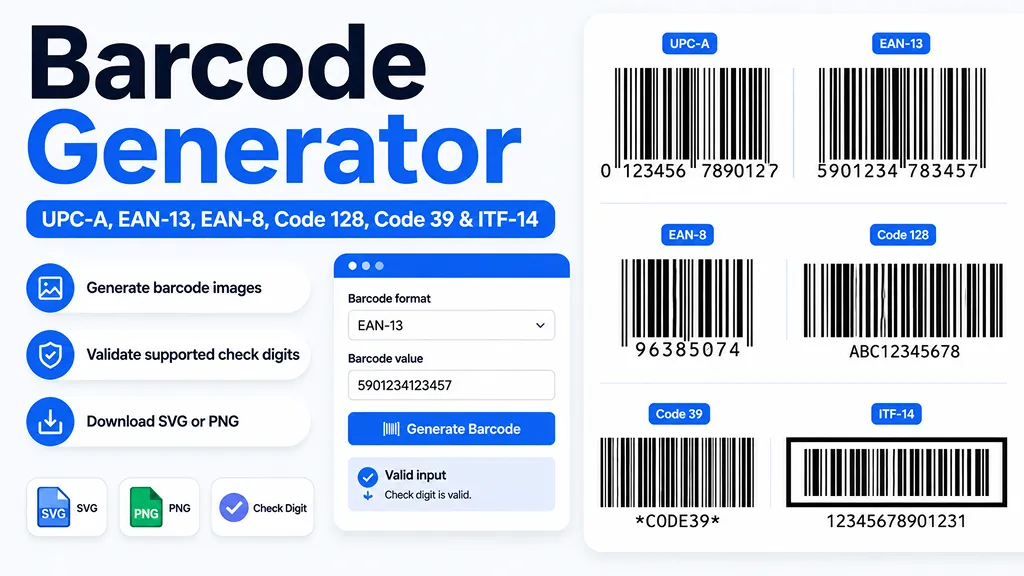
- UPC-A: commonly used for consumer products scanned at retail point of sale in the United States.
- EAN-13: part of the EAN/UPC family and widely used for retail products internationally.
- EAN-8: a shorter retail barcode used when package space is limited.
- Code 128: a compact alphanumeric barcode that works well for inventory, shipping, serial numbers, and internal IDs.
- Code 39: a simple alphanumeric format commonly seen in industrial, automotive, equipment, and asset-label workflows.
- ITF-14: commonly used for GTIN-14 identifiers on outer cases and logistics packaging rather than individual retail units.
UPC-A check digit calculator and validator
A UPC-A contains 12 digits. The final digit is a check digit calculated from the preceding digits. If you enter the first 11 digits, this generator calculates the last digit automatically. If you enter all 12 digits, it verifies that the final digit matches the expected check digit before generating the barcode.
The same check-digit helper is used here for EAN-13, EAN-8, and ITF-14. This is useful for catching a mistyped number, but a valid check digit does not mean the product identifier has been officially assigned.
Does a barcode generator give me an official UPC?
No. Creating the black bars and calculating a check digit are different from obtaining a unique product identifier. GS1 explains that GTINs are used to uniquely identify trade items, and GS1 is the official provider of GS1 GTINs and EAN/UPC barcodes. If you are preparing a product for retail sale, verify the identifier requirements of your retailer, marketplace, distributor, or trading partner before printing labels in volume.
Barcode printing tips for better scanning
Barcode readability depends on more than the encoded number. GS1 guidance emphasizes sufficient quiet zones, strong contrast, correct symbol size, appropriate bar height, and good print quality. For a practical starting point, keep dark bars on a light background, avoid stretching or compressing the finished image, leave open space around the symbol, and test the printed label with the scanner that will actually be used.
SVG is usually the better download format for professional printing because it can scale without becoming pixelated. PNG is convenient for documents, mockups, office labels, and quick digital use. For production packaging, always test a printed sample instead of relying only on an on-screen preview.
Code 128 vs. GS1-128
Code 128 and GS1-128 are not interchangeable names. Code 128 is the barcode symbology. GS1-128 uses Code 128 with additional GS1 rules, including structured Application Identifiers and FNC1 handling. This page generates standard Code 128 for general-purpose data; it is not a full GS1-128 Application Identifier encoder.
Why SVG is useful for barcode labels
A barcode is made of precise bar and space widths. SVG stores those shapes as vectors, so the barcode can be resized without the blur that can appear when a low-resolution bitmap is enlarged. The PNG download on this page is exported at a higher resolution for convenience, but SVG is preferable when your label or print workflow accepts vector artwork.
Frequently Asked Questions
- Q. What is the best barcode format for U.S. retail products?A. UPC-A is a common retail point-of-sale format in the United States. However, the correct symbol and product identifier depend on the retailer, product, package level, and trading requirements. For official product identification, follow GS1 and retailer requirements.
- Q. Can I enter an 11-digit UPC and let the generator add the last digit?A. Yes. Select UPC-A and enter the first 11 digits. The generator calculates and appends the 12th check digit. If you enter 12 digits, it validates the supplied check digit instead.
- Q. Can I use this barcode on Amazon, Walmart, or another marketplace?A. You can generate an image from a number you already have, but marketplace acceptance rules can differ and change. A generated image does not create ownership of a UPC or GTIN. Check the current identifier and labeling requirements of the marketplace before using the barcode commercially.
- Q. What is the difference between Code 128 and UPC-A?A. Code 128 can encode letters and numbers and is useful for inventory, shipping, and internal identifiers. UPC-A is a numeric retail barcode designed for a 12-digit GTIN-12 and is commonly associated with point-of-sale scanning in the U.S.
- Q. Should I download SVG or PNG?A. Use SVG when you need scalable vector artwork for labels or printing. Use PNG when you need a simple image file for documents, mockups, or systems that do not accept SVG.
- Q. Why might a printed barcode fail to scan?A. Common causes include insufficient quiet space, weak contrast, bars that are too narrow or short, distortion during resizing, low print quality, damage, or using a barcode type that does not match the scanning environment.