
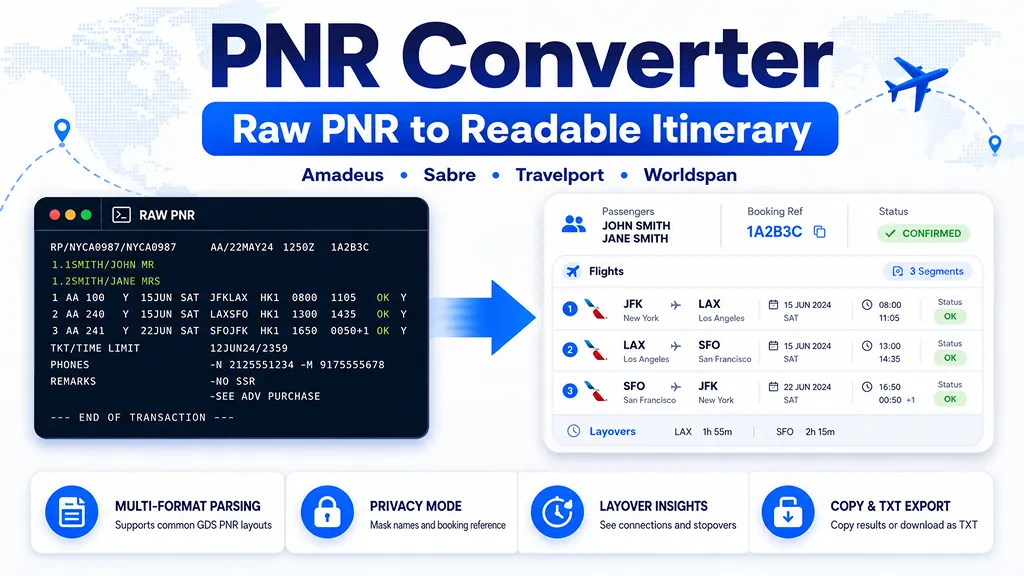
Paste a raw airline PNR or GDS itinerary to turn cryptic flight segments into a clean, readable trip summary. The converter recognizes common Amadeus, Sabre, Travelport/Galileo, and Worldspan-style flight lines directly in your browser.
Your pasted PNR is processed locally in this page and is not sent to an airline or booking system. Privacy mode masks passenger names and the booking reference in the converted result.
Load an example:
- This PNR converter is an independent formatting tool and is not affiliated with Amadeus, Sabre, Travelport, any airline, railway, or travel agency.
- Converted details are for convenience only. Check flight numbers, dates, airports, status, ticketing, and schedule changes with the airline or issuing agency before travel.
- The tool focuses on airline flight segments. Hotels, cars, rail, fares, ticket numbers, seats, SSR/OSI fields, and remarks may remain unparsed.
What is a PNR converter?
A PNR converter, also called a PNR decoder or GDS itinerary formatter, turns the compact text used by airline reservation systems into a readable flight itinerary. PNR stands for Passenger Name Record. A PNR may contain passenger names, flight segments, booking status codes, ticketing deadlines, contact details, special service requests, and internal remarks.
Travel agents often retrieve a booking from systems such as Amadeus, Sabre, Galileo, Travelport, Apollo, or Worldspan. The raw display is efficient for trained agents, but codes such as
KE901 Y 18JUL ICNCDG HK2 1120 1830 are not immediately clear to a traveler. This tool separates the airline, flight number, travel date, route, confirmation status, and local departure and arrival times into a cleaner itinerary.How to read a GDS flight segment
Although every reservation system has its own display conventions, common flight segments usually include the following parts:
- Airline and flight number: for example,
KE 901. - Booking class: a letter such as
Y,J, orF. The exact fare and cabin meaning can vary by airline. - Travel date: often written without a year, such as
18JUL. - Airport pair: for example,
ICNCDGmeans Incheon to Paris Charles de Gaulle. - Status code:
HKcommonly indicates a confirmed segment, whileTKorSCmay indicate a schedule change. - Passenger count: the number attached to a status, such as
HK2, usually refers to two confirmed passengers. - Local times: GDS itinerary times are generally displayed in the local time of each airport.
PNR vs. booking reference vs. e-ticket number
These terms are related but not interchangeable. The PNR is the reservation record. A booking reference or record locator is the short code used to retrieve that record. An e-ticket number is a separate ticket document number issued after ticketing. A reservation can exist before a ticket is issued, so a readable PNR does not by itself prove that the trip has been paid for or ticketed.
Supported PNR formats
The parser is designed for common airline flight-segment displays from Amadeus, Sabre, Travelport/Galileo, Apollo, and Worldspan. It can recognize compact airport pairs, separated airport codes, 24-hour times, AM/PM times, next-day arrival markers, common booking statuses, multiple passengers, and a booking reference when one appears in a recognizable location.
A PNR does not have one universal screen layout. Agencies may use scripts, custom remarks, passive segments, NDC content, hotels, cars, rail segments, or system-specific formatting. For that reason, the converter preserves the original input and lists possible itinerary lines that it could not fully decode.
Privacy tips before pasting a PNR
Passenger records may contain personal information. Before sharing a converted itinerary publicly, remove or mask names, phone numbers, email addresses, loyalty numbers, ticket numbers, payment remarks, special service requests, and the booking reference. The built-in privacy mode masks passenger names and the record locator in the result, but you should still review the copied text before sending it.
Why the travel year is required
Many terminal displays use a short date such as
18JUL and omit the year. The converter therefore asks for a travel year. For itineraries that cross New Year, the parser attempts to move a later segment into the following year when the dates would otherwise jump far backward. Always compare the converted dates with the airline or agency confirmation.Frequently asked questions
- Q. Can this tool check whether my booking is valid?A. No. It formats text that you paste. It does not connect to an airline, GDS, or ticketing database.
- Q. Can I convert only a six-character PNR code?A. No. A booking reference identifies a record but does not include the itinerary itself. Paste the full PNR display.
- Q.Why was a flight segment not detected?A. The line may use a system-specific layout, contain an open or surface segment, or omit information needed by the local parser.
- Q. Does HK always mean the ticket is issued?A. No. HK generally describes a confirmed reservation segment. Ticket issuance is a separate step.
- Q. Are departure and arrival times converted to my time zone?A. No. The result keeps the local airport times shown in the PNR.
- Q. Does the converter upload my PNR?A. This implementation parses the pasted text in the browser and does not call a booking API.