What is a random password generator?
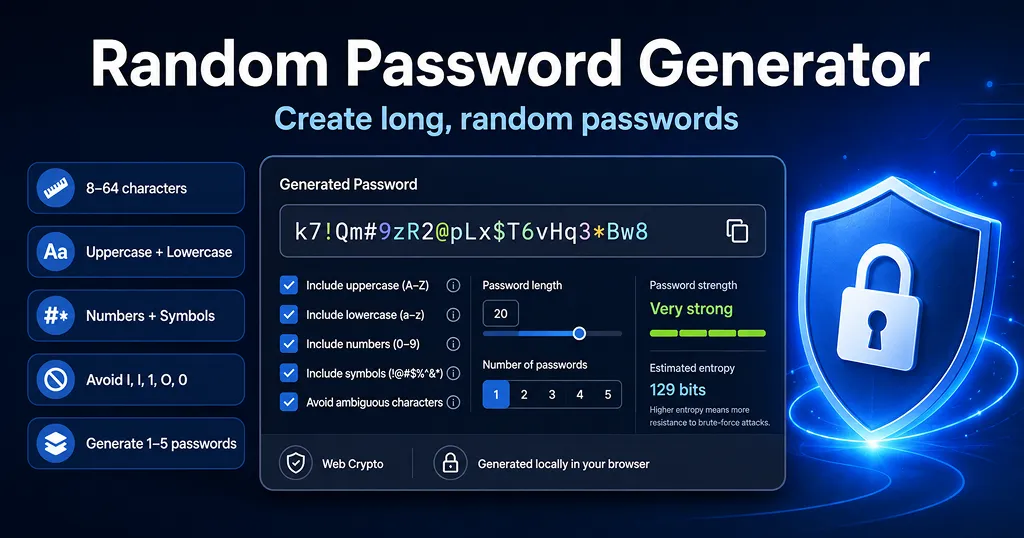
A random password generator creates a password from a selected set of letters, numbers, and symbols instead of asking you to invent one yourself. Human-created passwords often contain names, dates, keyboard patterns, or reused words. A generator is useful because it can create a long, unpredictable password that is different for every account.
This tool uses the browser's Web Crypto API and rejection sampling to choose characters. It also guarantees that each selected character type appears at least once. Passwords are generated in your browser by this page; the generated values are not sent to the server by the generator.
How long should a password be?
Current U.S. guidance places strong emphasis on password length. CISA recommends passwords that are at least 16 characters long, random, and unique for each account. NIST's current digital identity guidance requires a minimum of 15 characters when a password is used as a single authentication factor and recommends allowing passwords of at least 64 characters.
For this generator, 20 characters is the default because it gives extra length while remaining practical for password-manager use. If a website supports longer passwords, increasing the length generally gives you more possible combinations.
Do passwords need uppercase letters, numbers, and symbols?
Not always. NIST advises services not to force traditional composition rules such as requiring a particular mix of uppercase letters, lowercase letters, numbers, and symbols. Length, uniqueness, resistance to common-password attacks, and secure storage matter more than simply satisfying a checklist.
This generator still lets you include all four character types because many websites require them, and some users prefer the larger character pool. If a site rejects certain symbols, turn symbols off and increase the password length instead of reusing an old password.
What does estimated entropy mean?
The estimated entropy shown above is a mathematical estimate based on password length and the size of the selected character pool. For a uniformly random password, the simplified estimate is
length × log2(character pool size). A higher value means more possible combinations, but it is not a promise that an account cannot be compromised.Password security also depends on the website's password hashing, rate limiting, breach history, phishing resistance, and whether multi-factor authentication is enabled. Treat the entropy number as a comparison aid for generated passwords, not as an exact “time to crack” prediction.
Why use a unique password for every account?
Reusing the same password creates a chain reaction: if one service is breached, attackers can try the exposed credentials on email, shopping, banking, social media, and work accounts. CISA recommends unique passwords and a password manager so you do not have to memorize every random password.
When should you avoid ambiguous characters?
Characters such as
I, l, 1, O, and 0 can be hard to distinguish when a password is printed, read aloud, or typed on another device. The Avoid ambiguous characters option removes those characters while keeping the password random. Because this slightly reduces the character pool, using a longer password can compensate for the smaller set.Password generator best practices
- Use a different password for every important account.
- Prefer long randomly generated passwords; 16+ characters is a practical baseline.
- Store passwords in a reputable password manager instead of a notes file or spreadsheet.
- Turn on multi-factor authentication (MFA) or passkeys when an account offers them.
- Never send important passwords through unencrypted chat, email, or shared documents.
- Change a password promptly if you believe it has been exposed in a breach or phishing attack.
Frequently asked questions
- Q. Is a 16-character password strong?A. A randomly generated 16-character password can be strong for many uses, especially when it is unique. Longer is generally better when the site allows it, and important accounts should also use MFA or passkeys when available.
- Q. Is a password with symbols automatically stronger?A. Not automatically. Adding symbols increases the character pool, but a short or predictable password can still be weak. Length and true randomness are more important than merely replacing letters with familiar substitutions such as “@” for “a”.
- Q. Should I memorize generated passwords?A. Usually not. A password manager can store long, unique passwords and reduce the temptation to reuse easier passwords across multiple accounts.
- Q. Does this tool save my generated password?A. This page does not add generated passwords to local storage or send them through a form submission. They remain in the current page state until you regenerate, reset, navigate away, or reload the page.
- Security references: NIST SP 800-63B and CISA Secure Our World — Use Strong Passwords.